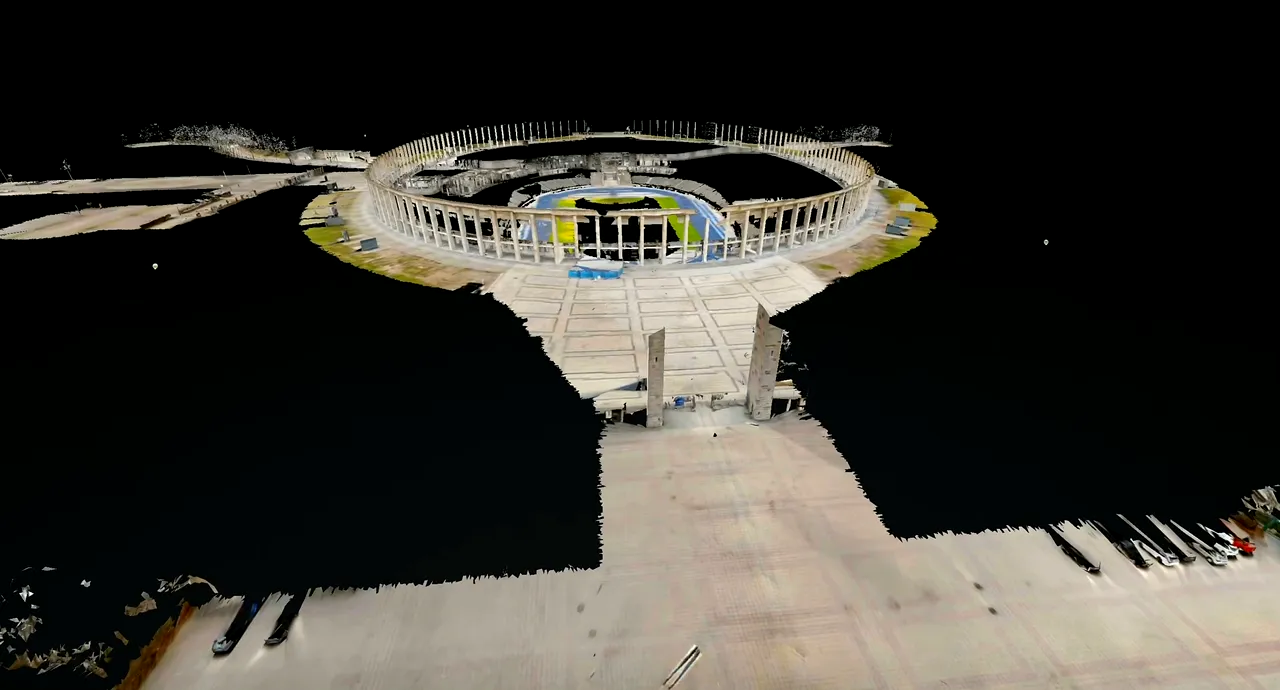
What does 3D laser scanning do for a venue? It records visible surfaces as measured spatial data that can help operations, touring, design and sales teams understand how a space is arranged. A registered point cloud can support measurements and as-built drawing work; a hosted walkthrough can help people orient themselves remotely. The right scope depends on which decisions matter, which areas are accessible, and what accuracy and deliverables the project actually needs.
For a stadium, arena, theater or event venue, a scan can help teams check a load-in route, clearances, sightlines, temporary layouts or a remote production reference. It records visible conditions only; it cannot reveal concealed construction or certify rigging capacity, structural safety or code compliance.
What is captured—and what is not
Terrestrial laser scanning measures visible surfaces from instrument positions and combines the observations into a spatial record. Depending on scope, deliverables may include a registered, colorized E57, RCP or LAS point cloud; PDF, DWG or DXF floor plans; and a hosted Matterport walkthrough with a MatterPak. These are different products, not interchangeable names for one file. A point cloud is not a finished CAD drawing or BIM model.
Every instrument has a line of sight. Seats, truss, curtains, cases, temporary walls, people and equipment can block surfaces behind them. A scan cannot see through a closed riser, behind a set wall, above a ceiling, inside a duct or beneath a floor. If a zone is locked, unsafe or operationally off-limits during the agreed window, it may not be represented. The deliverable should state coverage and exclusions rather than imply that “the whole building” was captured.
Color aids interpretation, but it is not a survey tolerance. The Matterport Pro3 specification identifies the camera as LiDAR and lists raw-depth information; that device figure does not promise project-level accuracy after capture, registration, control, processing and delivery. Set requirements around the intended use and agree how they will be checked.
Start with decisions and team needs
Operations teams may need routes, doors and fixed equipment; touring teams may need a truck-to-stage route, turning clearances and backstage access. Designers may need measured geometry, while sales and event teams may need a remote tour and floor layouts.
These needs do not require the same handover. A hosted tour supports orientation; a point cloud gives technical users spatial data to inspect or trace; drawings turn selected geometry into a planning reference. List each team’s decisions, then map them to capture zones.
| Team decision | Capture focus | Useful handover | Questions to agree |
|---|---|---|---|
| Can a truck and case train reach the work area? | Dock, ramps, doors, corridors, lifts, turns and threshold changes | Point cloud or measured plan; tagged hosted walkthrough for orientation | Which vehicle, case dimensions, route and access condition should be checked? |
| Will a touring layout fit the stage? | Stage, wings, crossovers, grid reference points and accessible backstage routes | Point cloud plus agreed plan sections and dimensions | Which stage edges, openings and height references are essential? |
| Can teams review seating and audience circulation? | Seating bowl, aisles, vomitories, concourses, suites and accessible paths | Hosted walkthrough; selected floor plans or point-cloud views | Is the need visual orientation, measurement, or both? |
| Can the venue be marketed or shortlisted remotely? | Public-facing rooms, arrival, pre-function, ballroom and meeting areas | Hosted Matterport 3D tour, media tags and floor plans where scoped | Who can view it, how long is it hosted, and what may be published? |
| Can a designer plan a renovation against current conditions? | Work boundary, adjacent rooms, ceiling transitions, columns, openings and interfaces | Registered point cloud and separately specified as-built drawings | What project tolerance, coordinate basis and drawing detail are required? |
These are planning pairings, not guarantees that one file answers every question. For a practical explanation of file roles, see the guide to point clouds and as-built drawing deliverables. If the first decision is whether to use a walkthrough, a technical scan or both, start with the Matterport and terrestrial-scanning comparison.
Build a venue capture-zone checklist
Make a floor-by-floor zone list and mark each area as included, optional or excluded. Tie each zone to an intended use. A zone label alone is not a specification: “backstage” can mean a corridor, a dressing room, a stage crossover, a trap room, a loading bay or all of them. Add the routes between the spaces as separate items so gaps in connectivity are visible before the crew arrives.
Load-in, docks and circulation
List the truck approach, apron, dock positions, doors, ramps, freight lifts, corridors, turns, thresholds and likely case-storage locations. Note any temporary bollards, parked vehicles or removable barriers. Ask whether the capture must document a particular route in its normal operating state or a temporarily cleared state. If clearances matter, specify what must be measured and which party will review those dimensions.
Stage, seating and audience areas
For a performing arts venue, define the stage, proscenium, wings, crossover, orchestra pit, fly tower and the accessible portions of the grid or catwalks. For a stadium or arena, list the bowl, field or floor, lower and upper concourses, suites, clubs, vomitories, tunnels, accessible seating routes and event-day conversion zones. Do not assume a capture from the public concourse includes restricted or overhead work areas.
Back-of-house and support rooms
Include the production office, dressing and green rooms, storage, catering, service corridors, control positions and rooms where a proposed setup depends on access. Decide whether equipment is captured in place or moved. If a room is sensitive, designate it for limited internal access or omit it. A hosted tour can reveal more than intended, so determine who may receive credentials and what media tags or room labels should avoid exposing.
Hospitality, event and exterior areas
For ballrooms and event floors, include pre-function space, partitions, service doors, bars, staging and the approach between rooms. If event sales needs a virtual tour, identify the rooms and views appropriate for customer access. Exterior plazas, terraces and approach routes can be part of a broader 3D building scanning scope, but weather, sunlight, moving vehicles and public access may influence the capture plan.
Access, obstructions and accuracy requirements
Venue work often has narrow access windows. The survey team may need an overnight period, a dark day, a setup window before doors, an escort, lift access, radio coordination or safety induction. Share event calendars, loading rules, restricted areas and contacts for local operations before the schedule is fixed. Clarify whether the venue must be empty, whether public areas remain open, and what happens if a show change removes a planned zone.
Capture quality is shaped by line of sight, scan placement, movement, reflective or transparent surfaces, setup density, registration, control and the way the data will be used. A requested “high accuracy” is not a complete acceptance criterion. Ask the recipient what they will measure, over what area, using what reference, and what deviation is acceptable. If the project requires survey control or a specified coordinate system, state it before capture and identify who supplies or verifies the control.
Informal planning may need visual coverage and relative dimensions; design coordination may require units, origin, orientation, control and a stated tolerance. Do not turn a camera specification into a building-wide guarantee. Ask for the method, QA and acceptance requirements in writing.
A clear scope-to-delivery workflow
- Discovery: collect floor plans, venue rules, project decisions, contact roles, access windows, coordinate requirements, target accuracy and desired file formats. Mark known gaps and prohibited zones.
- Scope and plan: agree the included rooms, routes, outdoor areas, capture method, scan density or detail where relevant, control approach, privacy rules, deliverables, schedule assumptions and exclusions. Define what counts as complete.
- Capture: conduct the site work safely and consistently, checking that planned zones and their connections are accessible. Photograph or note blocked areas and changes in access so the handover can disclose them.
- Registration and processing: align scan positions into the agreed project space, inspect alignment and coverage, and prepare the requested point cloud, hosted tour, floor plans or media tags. Not every output is generated automatically from a single capture.
- Quality review: compare coverage against the scope, review the registration and reference system, inspect sample dimensions or check points if specified, and confirm units, file names and opening instructions. Record limitations instead of hiding them.
- Delivery and acceptance: provide the named files, any support folders, viewer or hosting information, access permissions, a coverage note and an agreed correction path. Have the receiving team test the files in its actual software before declaring acceptance.
- Updates: agree how renovations, temporary builds or changed equipment are documented. A later update should distinguish new capture from unchanged background data and preserve a clear revision history.
This sequence is deliberately practical rather than tied to a single instrument brand. A hosted walkthrough can be paired with a registered E57 or with separately drafted floor plans when the buyer needs both orientation and technical reuse. The venue 3D scanning cost guide explains why processing and drawing scope should be priced explicitly rather than bundled under an unclear label.
How to select a 3D scanning services provider
A provider offering 3D laser scanning services should ask what the venue team will do with the result, not only how many square feet it covers. Venue-production experience matters because load-ins, sightlines, clearances and back-of-house workflows shape the scope. Ask how those needs become capture zones, what access is required and what is excluded.
- Request a written zone list and map, including exclusions, restricted areas and capture assumptions.
- Confirm which outputs are included: hosted Matterport tour, MatterPak, E57/RCP/LAS point cloud, floor plans PDF/DWG/DXF, measurements, media tags or rider notes.
- Ask how registration, coordinate placement and QA will be documented and how a sample check will be agreed.
- Confirm ownership and permitted reuse of raw files, processed files, photographs, tour links and derivative drawings.
- Clarify hosting duration, access controls, password or public-link behavior, update costs and archival responsibilities.
- Check that the quote includes processing, drawings, travel, schedule constraints and any required return visit—not only field capture.
- Ask who will answer handover questions and whether the team can test the files in its own software before acceptance.
Do not accept broad claims such as “complete as-built,” “survey grade” or “engineering ready” without a written definition. Specify tolerance, coordinate basis, coverage, limitations and whether drawings are reference plans, drafted CAD sheets or a model. Those are different scopes.
Frequently asked questions
Does one scan capture an entire stadium?
No. Large venues are made up of many connected zones, and capture depends on access and line of sight. A project plan should identify each included room, route and level, then record blocked or excluded areas. “Entire stadium” should be defined on a scope map rather than used as an assumption.
Is a point cloud the same as a 3D floor plan?
No. A point cloud is spatial measurement data made of points. A 3D floor plan is a visual or model representation that may be created from or alongside those data. A measured 2D floor plan is another deliverable. Specify the output and file format your recipient can use.
Can a scan verify rigging loads or structural safety?
No. It can document visible geometry and may help a qualified professional understand a space, but it does not certify structural capacity, rigging loads, anchor condition or safe working limits. Those require the appropriate engineering or rigging assessment.
Should we start with a pilot area?
A pilot can be useful when the venue has uncertain access, the recipient needs to test a file workflow, or the organization is still deciding which deliverables matter. Choose a representative area and define what the pilot must prove. It should not be confused with a complete venue scope.
Discuss your venue’s scanning scope.
Send the venue type, zones under consideration, access window and the decisions the scan needs to support. Acosta Spatial Collective is based in New Milford, New Jersey and works on projects more broadly.
Technical references
- Matterport Pro3 Technical Specifications — camera-level depth technology and published raw-depth specification.
- Matterport E57 File Overview — E57 contents and ASTM E2807 reference.
- U.S. Geological Survey LiDAR Base Specification: Deliverables — example of a formal acquisition and delivery specification framework.